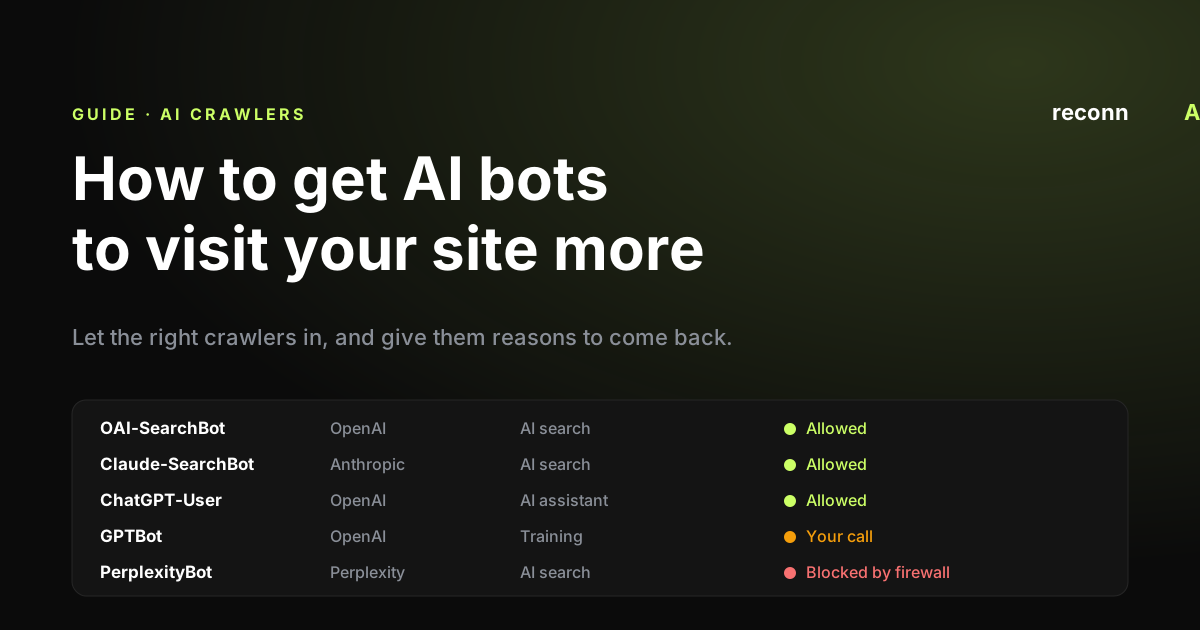
AI assistants like ChatGPT, Claude and Perplexity can only talk about what they have read. Before your page can shape an AI answer, a bot usually has to visit it and read it first. These bots are called AI crawlers.
Here is the honest part: nobody can force an AI crawler to visit. What you can do is stop accidentally blocking them, make your pages easy to read, and give them reasons to come back. Many sites fall down on the first of those without realising.
This guide covers the bots you need to know about, a six-step checklist, and how to check it is working.
What AI crawlers are, and the three types that matter
An AI crawler is an automated program that visits web pages and reads them for an AI company. Each one announces itself with a name, called a user agent (think of it as the bot's name badge). You use that name in a file called robots.txt (more on this in Step 1) to tell each bot whether it is welcome.
The big AI companies each run separate bots for separate jobs. They fall into three types:
- Training crawlers read the web to help build future AI models. Examples: GPTBot (OpenAI) and ClaudeBot (Anthropic). Letting them in may help your brand become part of what a model "knows", but the effect is slow and hard to measure.
- AI search crawlers build the index (a giant library catalogue) that AI assistants search when answering questions today. Examples: OAI-SearchBot, Claude-SearchBot and PerplexityBot. If you want to appear and be cited in AI answers, these matter most.
- User-triggered fetches happen when someone asks an assistant a question and it opens your page on the spot. Examples: ChatGPT-User, Claude-User and Perplexity-User.
The key point: these are separate decisions. Blocking a training bot does not block the search bot from the same company. OpenAI states that opting out of GPTBot is independent of OAI-SearchBot, and Anthropic's three bots each have their own rules.
| Crawler | Company | Type | Follows robots.txt? |
|---|---|---|---|
| GPTBot | OpenAI | Training | Yes |
| OAI-SearchBot | OpenAI | AI search | Yes |
| ChatGPT-User | OpenAI | User-triggered | Not always |
| ClaudeBot | Anthropic | Training | Yes |
| Claude-SearchBot | Anthropic | AI search | Yes |
| Claude-User | Anthropic | User-triggered | Yes |
| PerplexityBot | Perplexity | AI search | Yes |
| Perplexity-User | Perplexity | User-triggered | Generally no |
Why do some user-triggered bots ignore robots.txt? Because a real person asked for the page, the AI companies treat these visits like someone opening your site in a browser, rather than a bot roaming the web.
Sources: OpenAI crawler docs, Anthropic crawler docs, Perplexity crawler docs. Bot names and policies change often, so check these pages for the latest.
Step 1: Let them in
The most common reason AI bots do not read a site is simple: something is stopping them at the door. There are two doors to check.
Door one: your robots.txt file. This is a small text file at yourdomain.com/robots.txt that tells bots where they can and cannot go. Ask your developer or SEO team to check it does not block the AI bots you want. A bot that is not named follows the general rules for all bots, so a blanket "block everything" rule can shut AI bots out without anyone noticing. A typical setup that welcomes AI search and user-triggered bots, while making a deliberate choice on training, looks like this:
User-agent: OAI-SearchBot
Allow: /

User-agent: ChatGPT-User
Allow: /

User-agent: Claude-SearchBot
Allow: /

User-agent: Claude-User
Allow: /

User-agent: PerplexityBot
Allow: /

# Training bots: allow or disallow, but decide on purpose
User-agent: GPTBot
Allow: /

User-agent: ClaudeBot
Allow: /
Allowing training bots: the trade-off
- Benefit: your content can become part of what future AI models know, so they may describe your brand and products accurately even when they are not searching the web.
- Downside: your content is used to train models with no link, credit or visit back to your site, and blocking later does not remove what has already been collected.
Door two: your CDN or firewall. A CDN (content delivery network) is a service like Cloudflare that sits in front of your website to speed it up and protect it. It can block bots before they ever see your robots.txt. Since July 2025, Cloudflare has blocked known AI crawlers by default on new sites, and from 15 September 2026 it blocks training and agent bots by default on pages that show ads for new sites and free-plan sites. (Cloudflare calls bots that fetch pages for a person "agent" bots.) Ask whoever manages Cloudflare to check its AI crawler settings. If your robots.txt says "come in" but your firewall says "no", the firewall wins.
Most guides online explain how to block AI crawlers. Blocking is a valid choice. Just make sure it is a choice, not an accident.
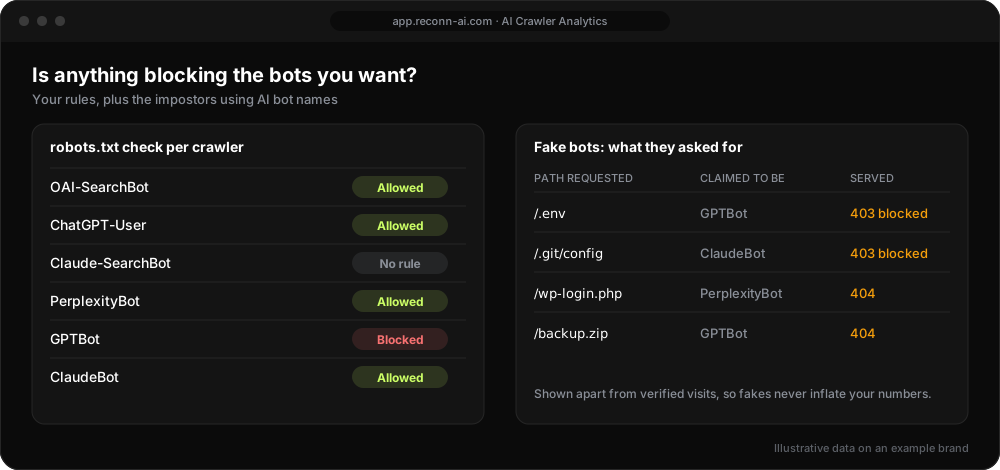
Check visits, not just rules. reconnAI's AI Crawler Analytics shows which AI bots actually reached your site, split by type, so you can spot a firewall block within days.
Step 2: Make your pages readable without JavaScript
Many websites build parts of a page in the visitor's browser using JavaScript (code that runs after the page loads). People see the finished page. Most AI crawlers do not run that code reliably, so they may see a half-empty page.
What to ask for:
- Key pages delivered as ready-made HTML. Your developers may call this server-side rendering or pre-rendering. The point is that the words are there when the page first arrives.
- Facts in plain text. Prices, product details and answers to common questions should be written on the page, not hidden in images, tabs, pop-ups or sliders.
- Clear structure. One main heading, descriptive subheadings, short paragraphs and tables for comparisons. This helps bots and people alike.
A quick test: open a key page, turn off JavaScript in your browser settings, and reload. Whatever disappears may be invisible to AI crawlers too.
Step 3: Remove friction
Every visit a bot makes is an opportunity. If it lands on an error or gets stuck, that visit is wasted, and a bot that keeps hitting problems may come back less often.
The usual culprits:
- Error pages. A 404 means "page not found". A 5xx error means the server failed. Fix or redirect broken URLs, especially ones AI bots keep asking for.
- Slow pages. Bots give up if a page takes too long to load.
- Redirect chains. One redirect is fine. Page A to B to C to D wastes the visit.
- Duplicate pages. The same content at lots of slightly different addresses (for example, with tracking codes or filters on the end) spreads bot visits thinly.
SEO teams call this crawl budget: the idea that bots only spend so much time on your site, so you want them spending it on pages that matter.
Step 4: Make your important pages easy to find
Bots find pages by following links and reading lists of your pages. Help them find the ones you care about.
- Keep your XML sitemap tidy. A sitemap is a file that lists your site's pages for bots. Each page has a "last modified" date. Only change that date when the content genuinely changes, or bots learn to ignore it.
- Link from busy pages to important ones. If AI bots already read your homepage or a popular guide, link from there to the pages you want read next.
- Use IndexNow for Bing. IndexNow is a free way to tell Bing straight away when a page is new or updated. Bing's index feeds Microsoft Copilot and some other AI tools. Many website platforms and SEO plugins support it.
- llms.txt is optional. You may hear about llms.txt, a proposed file that gives AI tools a summary of your site. Adoption is limited and there is no confirmed evidence it changes how often bots visit. Google has said it does not use llms.txt for Search. It is quick to add, so fine to try, but do not prioritise it over the steps above.
Step 5: Give them reasons to come back
Bots tend to return more often to pages that change and pages that other sites talk about.
- Make real updates. Add new data, refresh comparisons and note what changed and when. Changing a date without changing the content does not count.
- Earn mentions elsewhere. PR coverage, reviews, partner pages and links from respected sites help bots discover your pages and treat them as worth revisiting. Community sites matter too: our research found Google AI Overviews cite Reddit in about 1 in 5 answers.
- Use the citation loop. When an AI assistant cites your page, more people ask about it, and the assistant opens your page again to answer them. Being cited tends to lead to more visits, which can lead to more citations. For more on what earns a citation, see how LLMs decide which brands to cite.
None of this is guaranteed. But a page that is fresh, linked and cited is far more likely to be read than one that has sat untouched for two years.
Step 6: Measure it over weeks, not days
You cannot improve what you cannot see. Most marketing analytics tools (like Google Analytics) do not show bot visits at all, because bots do not run the tracking code. The record lives in your server or CDN logs: the raw list of every request made to your site. Bot visits rise and fall from day to day, so judge any change on the trend over several weeks.
Over a few weeks, you want to know:
- Which AI bots visit, split into training, search and user-triggered.
- Which pages they read, and which sections of your site they ignore.
- Which errors they hit, so you can fix wasted visits.
- Which important pages they never reach.
Watch out for fakes too. Anyone can give their bot a name like "GPTBot". Proper measurement checks that the visit really came from the AI company, usually by matching it against the IP addresses (internet addresses) the company publishes.
How reconnAI's AI Crawler Analytics helps
Reading raw logs is not a job most marketers want. AI Crawler Analytics connects to Cloudflare with a read-only token and turns the data into plain answers:
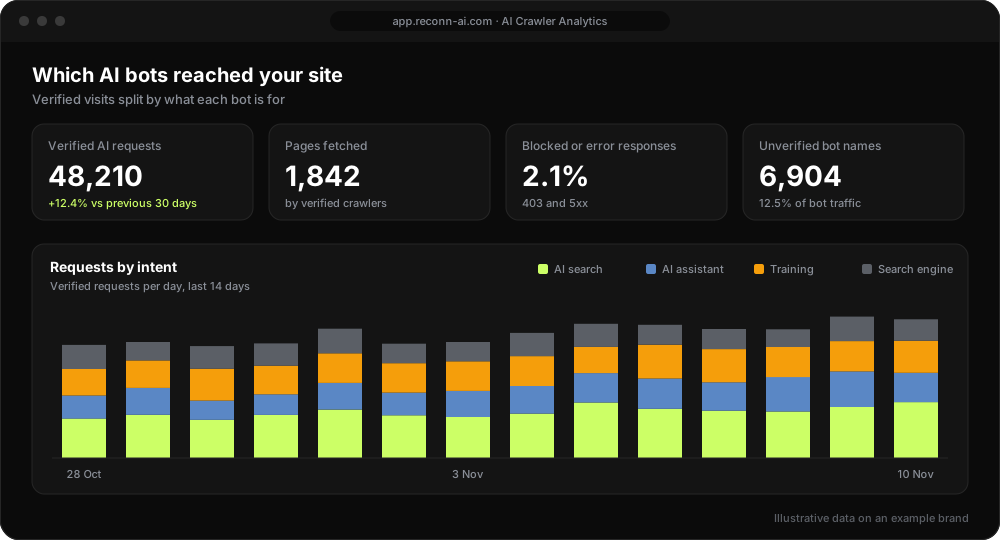
- Verified crawler tracking. Every request is checked against Cloudflare's verified-bot list, so real crawlers and impostors are shown side by side, never blended.
- Each bot's intent. Training, AI search, AI assistant and search engine bots on one chart, so you can see what decides citations today and what shapes models later.
- Every page they fetch, and what your site served. A searchable list of URLs, with redirects, blocks and errors broken out bot by bot.
- Technical health. A robots.txt check per crawler, alerts when a key bot starts getting errors, and how much of your sitemap each AI crawler has reached.
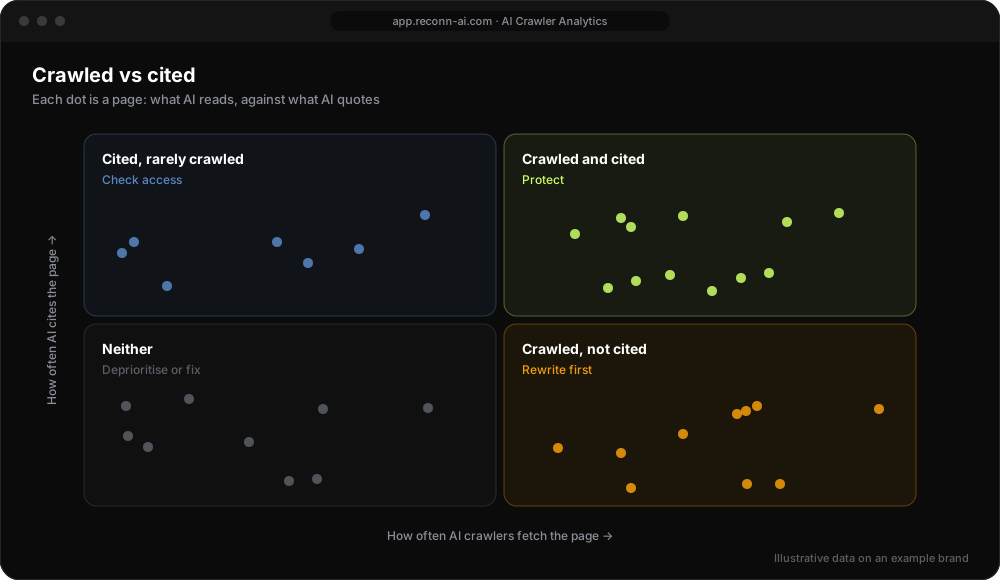
A crawl is not a citation. A bot reading your page does not mean an AI will recommend you. That is why AI Crawler Analytics sits alongside reconnAI's AI visibility tracking and citation tracking, which show whether AI answers actually mention and cite your brand. Put together, every page lands in one of four groups:
If you also want to see the people who click through from AI answers, our guide to tracking LLM text fragments in GA4 shows a 15-minute setup.
AI crawler optimisation checklist
- Let them in: robots.txt allows the AI bots you want, and your CDN or firewall is not blocking them.
- Make it readable: key facts are in the page text, not hidden behind JavaScript, images or tabs.
- Remove friction: fix errors, slow pages, redirect chains and duplicate URLs.
- Make it findable: sitemap dates kept accurate, links to key pages, IndexNow for Bing.
- Give reasons to return: real updates, PR and mentions on other sites.
- Measure: track verified AI bot visits and pair them with AI visibility data.
FAQ
What is ClaudeBot?
ClaudeBot is Anthropic's crawler that collects public web content to help train Claude models. Anthropic runs two other bots: Claude-SearchBot, which indexes pages for Claude's search answers, and Claude-User, which opens a page when someone asks Claude about it. Each can be allowed or blocked separately.
What is GPTBot, and should I block it?
GPTBot is OpenAI's training crawler. Blocking it opts your content out of training future models, but it does not remove you from ChatGPT search. That is handled by OAI-SearchBot and ChatGPT-User. If you want to appear in ChatGPT answers, keep those two allowed whatever you decide on GPTBot.
How do I get my site indexed by ChatGPT?
Allow OAI-SearchBot and ChatGPT-User in robots.txt, check your CDN or firewall is not blocking them, and make sure key pages work without JavaScript. OpenAI says robots.txt changes can take around a day to take effect. No one can guarantee your pages will be included or cited.
How often do AI crawlers visit a site?
It varies by site and by bot. Visits tend to follow how often your content changes and how widely it is linked and cited elsewhere. The only way to know for your site is to look at your logs over several weeks.
Does llms.txt help AI crawlers?
llms.txt is a proposed file that summarises your site for AI tools. Adoption is limited and there is no confirmed evidence it increases crawling or citations. It is cheap to add, so it does no harm, but it should not come before fixing access, readability and errors.
Do AI crawlers run JavaScript?
Most do not run it reliably. Content that only appears after scripts run, such as prices loaded into a widget, may be missed. Deliver important text in the page's HTML so every bot can read it.
How can I see which AI bots visit my site?
Check your server or CDN logs, filtered by AI user agents and verified against the IP addresses AI companies publish. Standard web analytics will not show these visits. reconnAI's AI Crawler Analytics does this for you and shows which pages AI reads and misses.
The short version
You cannot make AI bots visit, but you can stop turning them away and give them good reasons to return. Let them in, make your pages readable, remove friction, make key pages easy to find, keep content fresh and talked about, then measure what happens.
That last step is often where the surprises show up: bots blocked by a firewall setting nobody chose, or your best pages never read at all. If you are building this into a wider plan, start with building a GEO strategy from the ground up.
See which AI crawlers visit your site. Book a demo of AI Crawler Analytics
Want to know whether AI answers mention your brand too? Track your AI visibility with reconnAI.